

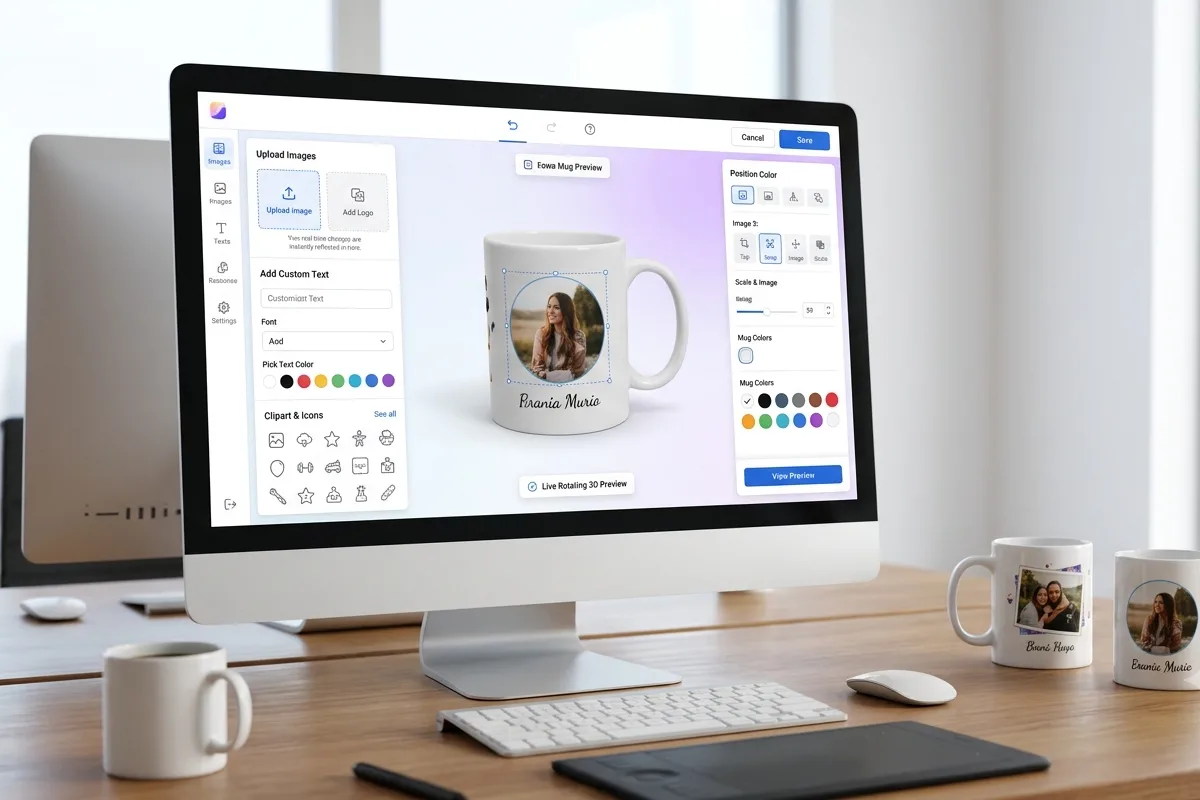
7 Best Mug Design Software Tools to Create Custom Mugs Easily
- Print XPand
- Technology
- 2026-07-22 10:18:46
- 2688K
Do you want to make your own mug design? Maybe you want a mug with your pet's photo, your logo, or a funny quote. The good news is that you do not need to be an artist to do this. Mug design software helps anyone build a cool mug design in just a few clicks.
In this blog, we will look at seven popular tools that let you design mugs online. Each one works a bit differently. Some are free. Some are made for big print shops. Some use AI to help you. Let's look at them one by one.
1. Kittl
Kittl is an online design tool that has a mug mockup generator. This means you can upload your design and see how it looks on a real mug, even before you print it.
The tool lets you place your design on the front, back, or sides of the mug. It automatically wraps the design around the mug shape. This makes the mug look real, almost like a photo.
You can also change the mug color and pick different backgrounds, like a desk or a living room. Kittl offers mockups in high resolution, and you don't need to add a watermark once you use their commercial license.
If you need extra help, Kittl also has an AI image generator and a background remover. These tools can clean up your artwork before you put it on the mug.
2. FastEditor
FastEditor is built for businesses, not just for one mug at a time. It is mug design software made for online shops, print companies, and gift stores that want to sell many custom mugs.
The special part of FastEditor is its 3D preview. When someone uploads a photo or logo, the mug spins around in 3D so they can see it from every angle. This helps buyers feel sure about their design before they order it.
FastEditor also creates the print file automatically. This file is ready for real printing methods like sublimation, laser engraving, or screen printing. It saves a lot of time because no one has to prepare the file by hand.
This tool works well for both regular customers who want a photo mug and companies that want mugs with their logo for gifts or events.
3. PrintXpand
PrintXpand is another mug design software made for print shops and online stores. It lets customers design their own mug right on a website, without needing to talk to anyone.
One neat feature is the wraparound preview. Customers can see their design curve around the whole mug in real time. This helps stop mistakes, like a picture getting cut off in a strange spot.
PrintXpand also checks photo quality. If someone uploads a blurry or low-resolution photo, the tool warns them before they buy. This helps keep the final mug looking sharp and clear.
Businesses can also use PrintXpand for bulk orders. For example, a company could order fifty mugs, each with a different name, all in one order. That is helpful for weddings, offices, or big events.
4. Pacdora
Pacdora is a free tool that lets you build a 3D mug design in your browser. You do not need to download any extra software.
To use it, you pick a mug shape first, like a ceramic mug or a glass mug. Then you upload your picture, logo, or text. You can change the color and background too.
Pacdora also gives tips while you design. For example, it suggests putting your logo on the left side, since that is what people see when they hold the mug in their right hand. It also lets you try a wraparound design if you want the picture to go all the way around.
Once you are happy with your mug, you can download it as a PNG, JPG, or even a short video (MP4) to show it spinning around.
5. Recraft
Recraft is an AI-powered mug design software. Instead of just uploading a picture, you can type a description, and the AI will create an image for you.
This is helpful if you don't have a photo or logo ready. You can describe what you want, like "a cute cartoon fox holding a coffee cup," and the AI will make an image close to that idea.
After the AI creates a mug base, you can add more designs on top, like text or a logo. You can keep changing it until it looks just right. Recraft also lets you make mockups for other products, like t-shirts, hats, and hoodies, not just mugs.
Since it works right in the browser, you don't need any design skills or special software.
6. CanvasChamp
CanvasChamp is a website where people can order printed mugs, along with many other custom items like canvas prints and blankets. Their mug design tool is simple and made for regular shoppers.
You can pick from more than ten mug styles. This includes classic ceramic mugs, travel mugs, heart-handle mugs, and even color-changing magic mugs that show your photo when the mug gets hot.
The design steps are easy. First, pick a mug type. Then upload your photo from your phone, computer, or social media. After that, you can add text or clipart and move things around until it looks good. You can preview the mug before you buy it.
CanvasChamp also lets you choose different print styles, like a two-sided print, a photo collage, or a full wraparound print. This makes it a good pick for gifts like birthday presents or work mugs.
7. Adobe Express
Adobe Express is a well-known design tool, and it also has a mug design feature. It works for both computer and mobile.
You can start with a ready-made template or build your design from scratch. Adobe Express has thousands of templates, so you can search for a style you like and change the colors, photos, and text.
There is also an AI tool inside Adobe Express. You can type a short prompt, and it will generate an image or a full template for you. This saves time if you are not sure where to start.
Once your mug design is ready, you can download it and send it to a printer, or share it online with friends. It is a good choice if you already use other Adobe tools and want something familiar and easy.
Which Mug Design Software Should You Pick?
There is no single best answer, since it depends on what you need. If you want a simple mug for a gift, tools like Pacdora, CanvasChamp, or Adobe Express are quick and beginner-friendly.
If you don't have any design skills and want AI to help you, Recraft is a strong choice. If you run a print shop or online store and need to handle many orders, FastEditor and PrintXpand are made for that kind of work. And if you want realistic mockups for branding or marketing, Kittl is worth trying.
No matter which mug design software you choose, the process is usually the same. Pick a mug, add your design, preview it, and then save or order it. With so many free and easy tools out there today, anyone can turn a simple idea into a mug they will be proud to use or give as a gift.
2688 people like this

About Premium Author
This post has been authored and published by one of our premium contributors, who are experts in their fields. They bring high-quality, well-researched content that adds significant value to our platform.
Leave a Reply
Please login to post a comment.




0 Comments