

How to Save Outlook Email MSG to PDF? - Simple Guide
- harber jenny
- Technology
- 2026-08-17 14:44:14
- 2786K
In this blog post, we will discuss the free method to resolve the issue of how to save Outlook email MSG to PDF format manually. Also, I will explain the complete migration procedure to save Outlook MSG file as PDF format using MSG to PDF Converter because maximum users are interested to go with the professional’s choice. Before starting, let us focus on some of the reasons which force users to implement MSG to PDF conversion process.
Reasons to Save Outlook Email MSG to PDF Format
- PDF files are widely used for document sharing, record keeping, and presenting digital documents in legal and professional contexts.
- PDF is an internationally standardized document format and supports security features such as password protection and permissions.
- PDF files can preserve important email content such as text, images, formatting, hyperlinks, and other document elements.
- You can easily read and open the PDF files on Windows OS, Mac, Mobile, Tablet, Laptop etc.
Manual Method to Save Outlook Email MSG to PDF File Format
In this section, we will discuss the free method for users to save Outlook email MSG to PDF file format without cost. The manual solution is beneficial for saving single or few MSG files. Follow below listed working steps to save Outlook MSG file as PDF format manually:
- Open Microsoft Outlook and open the email you want to save as a PDF.
- Click File from the Outlook menu.
- Select Print.
- From the printer list, select Microsoft Print to PDF.
- Click Print.
- In the Save Print Output As window, select the destination folder.
- Enter a suitable file name for the PDF.
- Click Save.
- The selected Outlook email will now be saved as a PDF file in your chosen location.
Why Do Professionals Not Recommend This Free Manual Method?
Manual method comes with numbers of drawbacks, that’s why experts have not recommended this way. Some of the limitations are mentioned below:
- The manual process can be time-consuming, especially when converting multiple MSG files.
- Users need to repeat the process for each email, which can become inconvenient when handling a large number of MSG files.
- Incapable of moving attachments into PDF.
- It is not a right solution for batch MSG to PDF conversion.
Professional Method to Save Outlook Email MSG to PDF with Attachments
As we already know the fact that manual solution is not an ideal and accurate method to save Outlook MSG file as PDF format. That’s why it is recommended to utilize professional method instead of manual process.
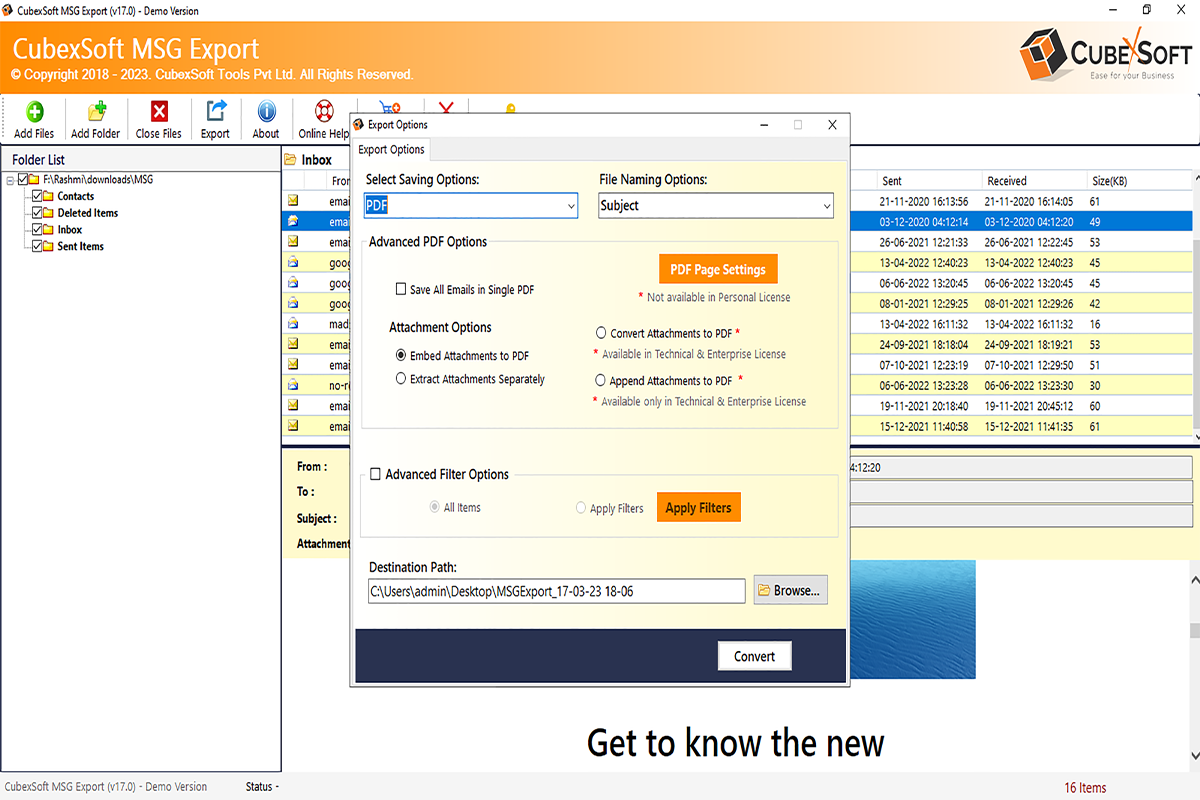
CubexSoft MSG to PDF Converter is an outstanding and error-free program which delivers fast and simple solution of how to save Outlook email MSG to PDF with attachments. By using this third party tool, one can easily save MSG file as PDF format in just a few clicks. During the conversion task, the tool preserves all email properties, folder structure and attachments without losing single information. With this program, users can simply save MSG to PST, EML, EMLx, MBOX, HTML, RTF, Office 365, Gmail, IMAP, Thunderbird, Yahoo, Exchange Server, and other file formats. Moreover, no technical skill is needed by a user to work with this application. Both technical and non-technical users can operate the tool without facing any difficulty. There are many benefits associated with this utility and some of them are mentioned below:
- It supports batch conversion, allowing users to process multiple MSG files in a single operation.
- This application maintains original email properties like metadata, attachments, hyperlink, message body, font size, style, images etc.
- The tool offers multiple file naming options to manage the output files.
- There is no need to install MS Outlook email application in your system to do MSG to PDF conversion procedure.
- This utility supports all the Windows OS versions (64-bit & 32-bit) like Win 11, 10, 8.1, 8, 7, XP, Vista etc. And it also supports all the latest and below edition of MS Outlook- 2024, 2021, 2019, 2016, 2013, 2010, 2007 etc.
Concluding Words
There are several ways to convert MSG files to PDF format. In this post, we discussed both the free manual method and the professional approach. The manual method can be useful when you need to convert only a few MSG files. However, users who need to process multiple MSG files or handle attachments may prefer a reliable MSG Converter.
Users can also try the free demo version of the tool to evaluate its features before purchasing the full version.
2786 people like this



About Premium Author
This post has been authored and published by one of our premium contributors, who are experts in their fields. They bring high-quality, well-researched content that adds significant value to our platform.
Leave a Reply
Please login to post a comment.








0 Comments